All JavaScript objects inherit properties and methods from a prototype.
in the previous chapter we learned how to use an object constructor.
function Person( first, last, age, eyecolor) {
this.firstName = first;
this.lastName = last;
this.age = age;
this.eyecolor = color;
}
var myFather = new Person("John", "Doe", 50, "blue");
var myMother = new Person("Sally", "Rally", 48, "green");
Prototype Inheritance
All JavaScript objects inherit properties and methods from a prototype.
Date objects inherit from Data.prototype. Array objects inherit from Array.prototype. Person objects inherit from Person.prototype. The Object.prototype is on the top of the prototype inheritance chain:
Date objects, Array objects, and Person objects inherit from Object.prototype.
Adding Properties and Methods to Objects
Somtimes you want ot add new proerties (or methods) to all existing objcts of a given type.
sometimes you want to add new properties( or methods) to an object constructor.
Using the Prototype Property
The JavaScript prototype property allows you to add new properties to object constructors:
function Person( first, last, age, eyecolor)
{
this.firstName = first;
this.lastName = last;
this.age = age;
this.eyecolor = color;
}
Person.prototype.nationality = "English";
Tuesday, June 12, 2018

Saturday, June 2, 2018
SQL Server 打開SA 帳號,並確保可以正常工作的工具與流程
這邊可以確定是已sa來login了

sql server configuration manager這邊的TCP/IP要確定打開,除此之外
防火牆設定(
https://docs.microsoft.com/zh-tw/sql/sql-server/install/configure-the-windows-firewall-to-allow-sql-server-access?view=sql-server-2017
)也必須確認沒有被擋

上面的檔案預設可以在這個路徑上找得到 C:\Windows\SysWOW64

關於 SQL server connectionstring
1. select "manage user secrets" option from project file.
2. found such kind of string
{
"ConnectionStrings:DefaultConnection": "Data Source=TERENCELIU_HP_N;Initial Catalog=RetailStuff;Integrated Security=True;Connect Timeout=30;Encrypt=False;TrustServerCertificate=False;ApplicationIntent=ReadWrite;MultiSubnetFailover=False"
}

3. in red, you can copy such kind of string from SQL Server Explorer directly,
4. see this picture

2. found such kind of string
{
"ConnectionStrings:DefaultConnection": "Data Source=TERENCELIU_HP_N;Initial Catalog=RetailStuff;Integrated Security=True;Connect Timeout=30;Encrypt=False;TrustServerCertificate=False;ApplicationIntent=ReadWrite;MultiSubnetFailover=False"
}

3. in red, you can copy such kind of string from SQL Server Explorer directly,
4. see this picture

you could see a connectionstring field, just copy and paste it.
Friday, June 1, 2018
AngularJS
ng-init --> we are not use this directive often. it is only for
<div ng-app="myApp" ng-controller="myCtrl">
{{firstName+" "+lastName}}
</div>
<script>
var app = angular.module("myApp",[]);
app.controller("myCtrl", function($scope) {
$scope.firstName = "Terence";
$scope.lastName = "Liu";
});
</script>
<div ng-app="myApp" ng-controller="myCtrl">
{{firstName+" "+lastName}}
</div>
<script>
var app = angular.module("myApp",[]);
app.controller("myCtrl", function($scope) {
$scope.firstName = "Terence";
$scope.lastName = "Liu";
});
</script>
Sunday, May 20, 2018
jQuery Event Methods & What is AJAX?
What are Events?
All the different visitor's action that a web page can respond to are a called event.
What is AJAX?
AJAX = Asynchronous JavaScript and XML.
In short; AJAX is about loading data in the background and display it on the webpage, without reloading the whole page.
examples of applications using AJAX: Gmail, Google Maps, Youtube, and Facebook tabs.
you can learn more about AJAX in our AJAX tutorial.
All the different visitor's action that a web page can respond to are a called event.
What is AJAX?
AJAX = Asynchronous JavaScript and XML.
In short; AJAX is about loading data in the background and display it on the webpage, without reloading the whole page.
examples of applications using AJAX: Gmail, Google Maps, Youtube, and Facebook tabs.
you can learn more about AJAX in our AJAX tutorial.
jQuery Chaining
With jQuery, you can chain together actions/methods
Chaining allow us to run multiple jQuery methods (on the same element) within a single statement.
jQuery Method Chaining
Until now we have been writing jQuery statement one at a time( one after the other)
However, there is a technique called chaining, that allows us to run multiple jQuery commands, one after the other, one the same element(s).
jQuery DOM Manipulation
One very import part of jQuery is the possibility to manipulate the DOM.
jQueyr comes with a bunch of DOM related methods that make it easy to access and manipulate elemens and attributes.
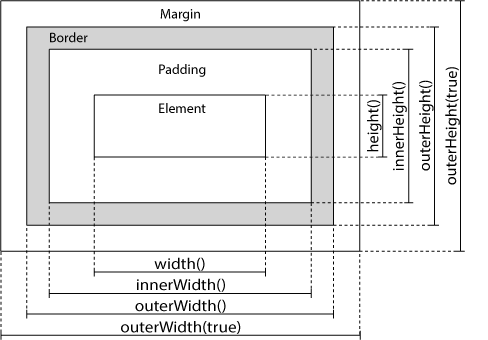
Chaining allow us to run multiple jQuery methods (on the same element) within a single statement.
jQuery Method Chaining
Until now we have been writing jQuery statement one at a time( one after the other)
However, there is a technique called chaining, that allows us to run multiple jQuery commands, one after the other, one the same element(s).
jQuery DOM Manipulation
One very import part of jQuery is the possibility to manipulate the DOM.
jQueyr comes with a bunch of DOM related methods that make it easy to access and manipulate elemens and attributes.
jQuery Dimensions
Saturday, May 19, 2018
JQuery
Basic syntax is :$(selector).action()
- A $ sign to define/access JQuery
- A(selector) to "query (or find)" HTML elements
- A jQuery action() to be performed on the elements(s)
examples:
$(this).hide() - hides the current element.
$("p').hide() - hides all <p> elements
$(".test").hide() hides all elements with class ="test"
$("#test").hid() hides all elements with id = "test"
Are you familiar with CSS selector?
jQuery uses CSS syntax to select elements. You will learn more about he selector syntax in the next chapter of this tutorial.
The Document Ready Event
$(document).ready(function ()
{
}
This is to prevent any jQuery code from running before the document is finished loading (is ready).
- A $ sign to define/access JQuery
- A(selector) to "query (or find)" HTML elements
- A jQuery action() to be performed on the elements(s)
examples:
$(this).hide() - hides the current element.
$("p').hide() - hides all <p> elements
$(".test").hide() hides all elements with class ="test"
$("#test").hid() hides all elements with id = "test"
Are you familiar with CSS selector?
jQuery uses CSS syntax to select elements. You will learn more about he selector syntax in the next chapter of this tutorial.
The Document Ready Event
$(document).ready(function ()
{
}
This is to prevent any jQuery code from running before the document is finished loading (is ready).
More Examples of jQuery Selectors
| Syntax | Description | Example |
|---|---|---|
| $("*") | Selects all elements | |
| $(this) | Selects the current HTML element | |
| $("p.intro") | Selects all <p> elements with class="intro" | |
| $("p:first") | Selects the first <p> element | |
| $("ul li:first") | Selects the first <li> element of the first <ul> | |
| $("ul li:first-child") | Selects the first <li> element of every <ul> | |
| $("[href]") | Selects all elements with an href attribute | |
| $("a[target='_blank']") | Selects all <a> elements with a target attribute value equal to "_blank" | |
| $("a[target!='_blank']") | Selects all <a> elements with a target attribute value NOT equal to "_blank" | |
| $(":button") | Selects all <button> elements and <input> elements of type="button" | |
| $("tr:even") | Selects all even <tr> elements | |
| $("tr:odd") | Selects all odd <tr> elements |
Use our jQuery Selector Tester to demonstrate the different selectors.
functions In a Separate File
If your website contains a lot of pages, and you want your jQuery functions to be easy to maintain, you can put your jQury functions in a separate .js file.
When we demonstrate jQuery in this tutorial, the functions are added directly into teh <head> section. However, sometimes it is preferable to place them in a separate file, like (use the src attribute to refer to the .js file).
Subscribe to:
Posts (Atom)